Pages

Showing posts with label Visual. Show all posts

Tuesday, January 28, 2014

Picture Schedule

I have been in quite a few preschool classrooms and honestly the first thing that I look for in a classroom is a visual schedule.  If I find it posted, I always say to the teacher- I love your schedule!  This is an excellent visual cue that can help students of many different ages.  In the autistic support classroom, students often live by that schedule and if you stray from it they will be quick to note the difference.  At the preschool level, a good deal of teachers think that students are unaware of the schedule or they don't care.   That might be true in a very small percentage of students but for most kids, they really want to know what is coming next in the schedule and what to expect throughout the school day.  Even if your routine is the same, every single day, preschoolers love to see it it posted.   I also use visual schedules to assist with maintaining appropriate behaviors.  Take this scenario, Johnny complains while doing table top activities that he really does not want to finish his work.  4 year old Johnny can't see an end to this activity, it just seems to him that it is boring and so long.  The teacher walks over to the schedule and points to the activity after table top activities, it is play time.  She asks Johnny to just hang on a little bit longer and then it will be play time.  He hears it from the teacher and he sees it on the schedule.  If you want to reward a child, let them know where on the schedule they could have a treat or play with a certain toy.

Here is an example of a preschool schedule that also looks like a clock


Here is another example of the schedule.  The teacher is using a clothespin to mark the current activity.

Wednesday, January 22, 2014

Reward Chart


Giving verbal rewards to students is great and for some students that is all it takes to make them feel important and to understand that they are meeting or exceeding a teacher's expectations.  For other students, they need something more.  They may need a sticker on a paper, a little prize at the end of the week, or a high 5.  Some students need a constant visual reminder of the expectations and that they are doing a great job.  I love using star charts.

I apologize for the poor quality of the picture.  If you look closely at the top are the rules/expectations- to sit, be quiet, and to complete work.  Even if a student is an amazing reader, I encourage teachers to incorporate pictures into the rules if the student is age 10 or under.  A student that has difficulty attending or behaving likely needs an extra visual reminder to increase comprehension.  As you work through an activity, reward a student with stars given either at a timed or intermittent schedule.  Some students may need this reinforcement during every activity and some may only need one reward chart filled up for the entire day.  I like velcro charts more then sticker charts, they are reusable and I think the students often get some sensory feedback from the velcro.

Sticker charts are plentiful though on the internet so feel free to search pinterest or the cyber space for other options.   Add some picture rules, laminate and make a velcro chart out of anything you find!

Wednesday, January 15, 2014

Using visual recipes for independent living


Use a recipe separated into segments to highlight one step at a time, including a photo or video of each step.

Create your own using Google images or search the internet for ready-made recipes.  Visual recipe books are also available at sites such as www.amazon.com.  Recipes will range in their reading levels and required skills and can be tailored to individual students' needs. 

Fruit Salad Recipe


Prepare the fruit:  wash, peel, seed, core and cut it into small bite-sized pieces.


Place fruit in a bowl:  add fruit to bowl after cutting into pieces.


Add other ingredients: add shredded coconut, raisins, or nuts.


Add yogurt:  use enough to lightly coat fruit, and toss lightly with a large spoon.


Visual Cues - Kristin Dibler

Visual cues that assist students with visual impairments...


High Contrast Materials -

 Yellow on Black, Black on White


Lightbox - 

lights up materials placed on the box for students with attention difficulties


Page Blocker - 

piece of paper, fold paper in half


Tracking Devices - 

colored popsicle stick, colored tracking bar


Magnifiers


Large Print, Bold Font, Bold Lines

Visual Learner


Visual Learner - Jackie Steer

If you are a visual learner, you prefer using images, pictures, colors, and maps to organize information and communicate with others. You can easily visualize objects, plans and outcomes.
This is the Early Childhood Task List. The students are able to identify the tasks that they have accomplished and see the ones that they still need to work on. It is a visual tracking guide for them.

The preschool early learning standards are located on the walls for the students to refer back to when they are developing their lesson plans. They also have the preschool standards books to use as a reference.


Every morning I list on the white board what they need for the day. Their journal is listed on the board, their task number from the task list, the objective for the week, and what the theory members and the field member need to turn in that week. The picture on the right shows the preschool classrooms and the students that will be in field for the two week rotation.

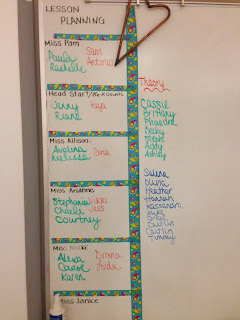
In my classroom, I provide many visuals for these types of learners. Front and center of my white board, the students see their Task number from their Early Childhood Task List and the objectives they will be learning while exploring the chapter. Each morning we have a specific warm-up for each day of the week. Everyday the students know what their journal will be. I also list the theory work for them to accomplish throughout the time they are in their theory rotation. On the other side of the board, I have listed each preschool teacher and the students that will be rotating for those two weeks. In a pocket chart, students will find all the necessary papers they are required to fill out for field. I also keep missed work for absent students as well as enrichment activities in there if a student would like extra work. The two bulletin boards in my room have information regarding their program, Students Occupationally and Academically Ready (SOAR) as well as important dates they need to be aware of. The other bulletin board is to show case the student’s hard work and effort on projects. The early childhood standards for preschool are hanging up around our room so they can always refer back to them when they are developing their lesson plans. Open-ended questions are listed above my white board for the students to keep in mind how to increase language comprehension in the preschool children.

On one corner of the room you can find a vocabulary word wall that has the vocabulary words and chapters the words come from. On the back is the definition of the vocabulary word.  Students are encouraged to test each other in a vocabulary review game.

We take advantage of the fact that we have mac laptops and Ipads in the classroom. These tools help the visual learners design and create lessons and projects.  I try to incorporate youtube videos that relate to what they are learning about.
When we take notes, I either have a powerpoint with guided notes or I use the ELMO in the classroom to project important information. When we go over our math journal every Wednesday, I have students come up to the white board, smart board, or ELMO to show the class how they solved their answer.

One of the most important visuals is the preschool classroom itself. The students take on the role of a teacher assistant and have to scan the classroom for behaviors, student needs and requests.

Other things to take into account for visual learners are:
·      Add diagrams to your notes whenever possible.
·      Dates can be drawn on a time-line
·      Organize your notes so you can clearly see main points and supporting facts and how things are connected.
·      Connect related facts to your notes by drawing arrows.
·      Color-code your notes with highlighters so that everything related to a topic is the same color.
·      Use color, layout, and spatial organization in your associations, and use many 'visual words' in your assertions.

Tuesday, January 14, 2014

An Example of a Multi-sensory Lesson

This lesson demonstrates how a multi-sensory approach can be used to teach a single lesson.  Pay attention to the beginning because the students are singing a song as they transition to sitting in a circle for the math activity.  The children clearly have been instructed how and when to respond to their teacher.


Daniel Tiger

I work with preschool age students.  I think that everyone has heard a preschooler just randomly break out into song.  They love music.  Cute, catch tunes usually gain their attention.  They also of course love watching cartoons.  I am a huge fan of this little guy.  His name is Daniel Tiger.


I love to find simple songs that help with basic social skills or behavior skills.  Paired with a visual, especially a cartoon is amazing.  The Daniel Tiger cartoon on PBS is a social skills and positive behavior based cartoon.  They have many songs that go along with positive behaviors.

The following is an example of a song about a needed social skills.  It discussing talking about doing something new.


Here is a link to a list of all of Daniel Tiger's songs.  I love the Find a way to play together and When you Feel so Mad you want to Roar.

There are books that just were published outlining many of the Daniel Tiger shows.  They also have the characters for purchase at most toy stores.  They are great for acting out many of the social skills outlined in the show.  I love that Daniel Tiger embraces the multi sensory approach to social skills- visually watch, listen to the songs, move to practice the social skill.

Red and Green Choices


When I taught school age Autistic support our school used Green Irene's red and green choices behavior management system for one year.  You can check out her website with the above link.  I liked parts of the program but I did not embrace the entire program.  

Last year I worked with several preschools who had difficulty displaying appropriate behaviors.  I decided to try out a simplified version of the program.  We talked about red and green choices in one-on-one situation or in a group of two students.  


I laid out cards that were green or red.  I first discussed the red choices- or negative choices and then we discussed the green- or positive behaviors.  We sometimes acted out the green choices.  When I used this system as part of a school wide behavior system we were encouraged to also act out the negative behaviors.  Our behaviorists in the school made a video of both red and green choices.  After my students viewed the video, two of my students proceeded to act out many of the red behaviors throughout the school day.  I know that they simply wanted to show off and display attention seeking behaviors however I really was not on board with acting out the red choices.  I do not think that reenacting something that a student should not do is necessary, I think that practicing and modeling the positive behaviors is important.


I think asked students to decide which pockets the cards belonged in, the red or green pockets.  I wanted this to be a no-fail situation so the cards of course could be sorted by color.  If the preschool teachers were on board, I provided them with red cards that corresponded to the current negative behaviors displayed by the student and pictures of the requested/desired behaviors (green).  I suggested that the teachers have them handy so that they could approach the student when the desired behavior was seen and say something like "good job, Johnny, I like how you are_______" and then pair the verbal praise with the visual.  If they notice a negative behavior, the teacher can show the student the red card and say "I need you to stop" paired with the visual and then "This is what we should do" and pair it with the visual.

This strategy can be paired with a traffic light system.


This is a system that can be used individually or as a whole class.   Students often have their names or pictures attached to a clothespin that is hooked onto the traffic light.  Everyone starts out at the yellow light everyday.  They can move up or down depending on their positive or negative choices during the day.  Activities just as playtime, computer time, extra outdoor time, etc is tied to the traffic light.  I often made my traffic light with 3 green lights, 2 yellows, and 2 reds.  In some classrooms, teachers are hesitant to move students back to green once they have displayed inappropriate behaviors but that is important.  Students need to know that one mistake is not going to ruin an entire day.


Wednesday, December 18, 2013

video modeling new skill --Sue Bank

This is an example of video modeling a new skill.  In this video, I model how to answer a phone in a classroom.  The script is also posted on the wall next to the phone for visual support. 
Once a student previews this, he can then practice the skill.  As a formative assessment, I can record his progress and we can review and discuss strengths and needs. 


Friday, December 13, 2013

Preview jobs using photos -- Sue Bank

Using photos to preview a new job, such as this one shelving books in the school library, helps to prepare students for learning before they enter a new environment.

Problem-Solving bulletin board -- Sue Bank

This is a bulletin board adapted from Successful Problem-Solving for High-Functioning Students with Autism Spectrum Disorders; by Mataya and Owens (2013). 

After initially teaching this process in a small group setting, students will continue to have a visual reminder of this process when solving a problem.  In addition to seeing the options available, the colors of the circles also provide students with guidance in better choices, with red representing less effective results and blue representing more effective results.

Wednesday, December 11, 2013

Vision Skill - Expanded Core Curriculum - Kristin Dibler

Expanded Core Curriculum

"Educators define 'core curriculum' as the knowledge and skills expected to be learned by a student by high school graduation. Generally, the core curriculum consists of knowledge and skills related to academic subjects.... With respect to blind and visually impaired students, the existing core curriculum, as developed for sighted students, is entirely appropriate and generally available... But most professionals hold a strong position that there is an expanded core curriculum for visually impaired students that requires additional areas of learning. There are experiences and concepts casually and incidentally learned by sighted students that must be systematically and sequentially taught to the visually impaired student. The core curriculum for visually impaired students is not the same as for sighted students. Indeed, it is much larger and more complex."

The Expanded Core Curriculum includes:
  • compensatory or functional academic skills, including communication modes
  • orientation and mobility
  • social interaction skills
  • independent living skills
  • recreation and leisure skills
  • career education
  • use of assistive technology
  • sensory efficiency skills
  • self-determination
Information provided by AFB

Visual

Visual schedule/steps to tasks
Videos/Modeling of Task

Auditory

Reading about designated task
Movie with speech about task

Tactile

Writing about task
-the steps of the task
-as a reflection after performing task

Bodily-Kinesthetic

Actual performance or acting out of task


MI Presentation - Jackie Steer


These posters were made by the early childhood students. The chapter we were covering was child development theories and principles. The students researched different child development theorists and picked one to present. The students also took a multiple intelligence test where they were able to answer questions that determined what type of learner they are. It was important for the students to be able to identify the different types of learners so that when they are teaching the preschool children, they will remember to try to teach to all the learners whether they may be an auditory, tactile, kinesthetic, or visual learner!

Vision Skill - Tracking/Scanning - Kristin Dibler

Tracking & Scanning

Tracking is the ability to visually follow horizontally, vertically, and diagonally without head movements and with smooth eye movements. This is an important skill for reading. 
 
Scanning is the ability to visually search for an object and then systematically from one object to another. This is important for scanning text when reading.

These skills tend to overlap at times, which is why they are listed together. In order to properly scan, you must be able to properly track in all directions. For students with visual impairments, we teach them the systematic tracking & scanning approach, which is top to bottom, left to right - the same pattern we follow when reading! This skill can be important for students with unstable eye movements, and/or vision field loss.

Visual

Paper activities-
   -dot to dots
   -mazes
   -tracking worksheets - letters, shapes, numbers, etc.
iPad activities
Hidden Pictures or Look & Find books

Auditory

Verbal description of specific activity
Verbal description of techniques
Verbal review of areas for improvement, skill improvement

Tactile

 Paper activities that involve drawing-
   -Dot to dots
   -Mazes
iPad activities that involve tactile input

Bodily-Kinesthetic

Hide & Seek related games in various environments
Eye Spy in various environments 

Between the Lines Advanced Lite


By Hamaguchi Apps for Speech, Language & Auditory Development

Description
Hamaguchi Apps for Speech, Language & Auditory Development presents this groundbreaking iPad app designed for adolescents-adults who would benefit from practice interpreting vocal intonation, facial expressions, body language, and idiomatic or slang expressions. Using real photographs, voices and short mini-video clips of a variety of social situations and expressions, this app provides a dynamic way to help learn and practice interpreting the messages that are “between the lines” and simply can’t be replicated with worksheets and static flashcards. Scenes for the body language activity include a shopping mall, office, restaurant, family room, outdoors, school and party.

This Lite app provides 12 samples of each of the three activities for a total of 36 tasks and is for a single user only. (The full version provides 225 total tasks)
This app uses American expressions and body language.


Vision Skill - Braille - Kristin Dibler

 Braille Instruction

One important skill that I teach is Braille. We are required to teach Braille for students with a diagnosis where they currently have severe vision loss OR if they have a prognosis where their vision will progressively diminish. Most of my students that I am currently working with do have functional vision, but their diagnosis is progressive, meaning in the future they could lose most of, or all of their functional vision.

There are a variety of skills involved with Braille, not just learning the letters, numbers, contractions, etc. You must enhance tactile identification skills, tactile tracking skills, learn to read and write Grade 1 Braille, and then Grade 2 Braille.

It is important to incorporate a variety of modalities for Braille instruction, not only to provide a variety of activties and to touch a student's preferred modality, but to also ensure that the student's tactile sense is not "overwhelmed". For Braille learners, their fingertips can become sore and sensitive, until they work on prolonging their tactile skills.


Visual

Braille Flashcards - enlarged image of contraction
Color-in Enlarged Braille Template
Tactile books, papers, etc. with images
iPad activities for Braille contraction learning

Auditory

Verbal review of lesson, contractions
Verbal identification of flashcards or Braille images

Tactile

Braille Flashcards - actual Braille contraction
Braille images
Tracking Paper
iPad activities for Braille contraction learning that involve tactile selection
Braille using Brailler

Bodily Kinesthetic

Board activities-
 Select/circle the appropriate contraction
 Draw the contraction
 Match print letter(s)/number(s)/word(s) to appropriate Braille contraction
 Pictionary - draw image of contraction or a word containing the contraction 


Wednesday, November 27, 2013

Circle Time Rules


I often provide this visual to many preschool teachers as a support for circle time behavior.  Preschoolers often need to be taught what the expectations are for circle time or group activities.  It is not something that comes naturally for a 3, 4, or even a 5 year old.  Some preschoolers have experienced sitting for library story time or for special activities but many enter preschool without having experienced the need to sit in a structured group.  Providing practice and visual rules for circle time our group activities is helpful to everyone involved.

I should put a disclaimer on this that I DID NOT create this, it was created by someone else and has been passed onto many different teachers.   The key is not only to post these rules for students to see but also to review, role model, and practice each rule.  What does a sitting body look like?  Can it look differently in different students?  In your classroom is a sitting body sitting with criss cross applesauce legs?  What are looking eyes?

In many cases a preschool teacher might have more specific rules for their circle time and these rules can be adapted however circle time or any classroom rules should be kept short- 3 to 5 rules at the most. 

Circle Time/Morning Meeting rules of course are not unique for preschoolers.  Elementary students also thrive on very specific and visual rules.


Sunday, November 17, 2013

Visual Cue Chart for Listening Skills

When I taught in an Autistic Support classroom I used a listening poster.  I reproduced a poster that I found on this website.  The below picture is the poster that she used.


https://blogger.googleusercontent.com/img/b/R29vZ2xl/AVvXsEhkYdLQNKbvyN7jycoKN6G3NYL-6_tqeR5_DMlYPRAnpnTZjnbLMOJAXyARJXKbJTvwy3ZYxgz4gjx6M5m1DG9qt-knNGyGO06DDsY4xDnEEJZeOb2mUiXbZ24fMnP6fO_xAhjtyKkoKw-3/s1600/CIMG0401.JPG

 I created my own version with velcro pull off signs.  I also made a most later using a picture of one of my student's showing me good listening posture.  I have suggested posters like this for some of the preschool classrooms that I visit.  Simply having the poster in the classroom though is not adequate, it is also the practice behind it.

Every morning during circle time my Autistic support classroom would practice one of the steps to better listening.  Sometimes we would practice two.  I started out the process by role playing the proper way to sit, or raise your hand, or where to keep your hands and then I would ask them to show me.

I included this poster in both the categories of movement and visual input because the role modeling and pulling off or putting on the poster components often added some extra movement to our circle time.  Role modeling often provides both visual and physical input to learning a skill.